Hello everyone,
Since the release of version 4.2.0 three weeks ago, we have received a wealth of valuable feedback and suggestions from our user community. Thank you so much for your ongoing attention and support for MarginNote. It’s your voice that drives us forward.
Today, we are thrilled to announce the official release of MarginNote 4.2.1!
In this version, we’ve not only focused on optimizing key areas based on your feedback but are also proud to introduce a highly anticipated flagship feature – AI OCR – designed to completely revolutionize your data entry and knowledge organization experience.
 Based on your suggestions, version 4.2.1 includes the following key optimizations:
-
Reduced Point Consumption for Light Model: Consumption rate has been decreased by approximately 30% compared to the previous version, helping you save points and study longer.
-
Optimized Assistive Excerpt Interaction: The button in the top-right corner of the excerpt box has been adjusted to prevent accidentally triggering the Ask pop-up, making operations smoother.
-
Fixed AI Point Display Issue: The “Monthly Points” counter now refreshes and displays correctly, giving you a clear view of your point balance.
-
More Accurate AI-Generated TOC to Mind Map Conversion: Fixed structural anomalies and improved positioning accuracy. When “Group (by Document TOC)” is selected for the “Mind Map Insertion Position”, new excerpt cards can be more precisely placed onto the corresponding branch nodes in the outline-based mind map.
-
AI Terms are published (MarginNote 4 → Setting → AI → AI Terms)
-
… (And more! Check the full update log via
 App Store) …
 New Feature: AI OCR Arrives!
Since MN3, the OCR feature has been widely loved, but it also faced challenges with complex formulas, unusual tables, vertical texts, classical Chinese layouts, handwritten notes… The recognition results were often unsatisfactory. Even with “Online Correction,” it wasn’t “smart” enough to truly “understand” complex information and convert it into editable digital text. Users often ended up manually typing, formatting, and adjusting layouts, wasting precious learning and thinking time on these repetitive, low-value tasks.
Now, AI OCR is here! Powered by large language models, it will handle information entry and preprocessing for you, liberating learners from tedious input and organization work.
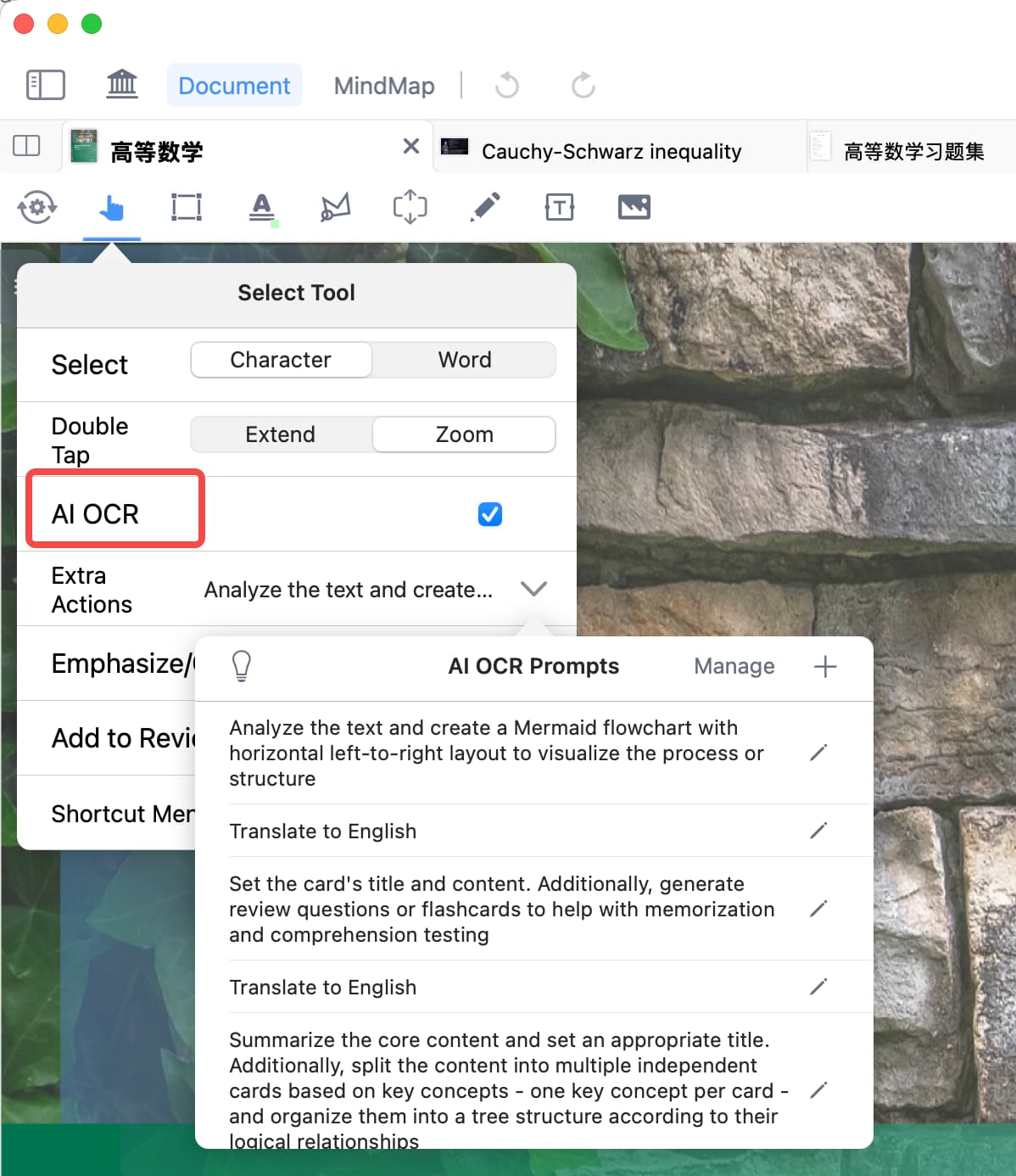
 Key Highlights of AI OCR:
-
Full Format & Language Support: Formulas, tables, handwriting, images, vertical text, classical Chinese… it recognizes almost everything with significantly improved accuracy. Its language support also surpasses the limitations of Global OCR (which currently supports 10 languages), effortlessly handling rare languages.
AI OCR not only recognizes accurately but also delivers beautifully formatted results. For example, when the original text has numbered points, it accurately recognizes the numbers and automatically creates line breaks accordingly.
-
Excerpt and Recognize Instantly, No Secondary Clicks Needed: Simply make your selection – the recognition result (Markdown formulas, tables, etc.) is directly written into the card’s comment, achieving a ‘What You See Is What You Get’ experience and seamlessly integrating into your learning flow.
-
Transparent Point Consumption: The point cost for each recognition is displayed in real-time (typically only 0.01~0.1 points), so you always know what you’re using and can learn with peace of mind.
 Exclusive Advanced Capabilities for Max Users:
-
While recognizing, the AI can also automatically process the content for you! Supports custom prompts to achieve:
-
Translation (automatically detects language)
-
One-click generation of Mermaid flowcharts
-
Intelligent flashcard creation added directly to review
-
Extraction of key concepts to generate tree-style mind maps
-
…
-
-
We’ve also preloaded 5 commonly used prompt templates, ready to use out-of-the box. You can also edit these or create new custom prompts.
-
Furthermore, the Deep Thinking Mode is supported. Adding keywords like “deep analysis” to your prompt activates a more powerful model for more accurate recognition of complex content.
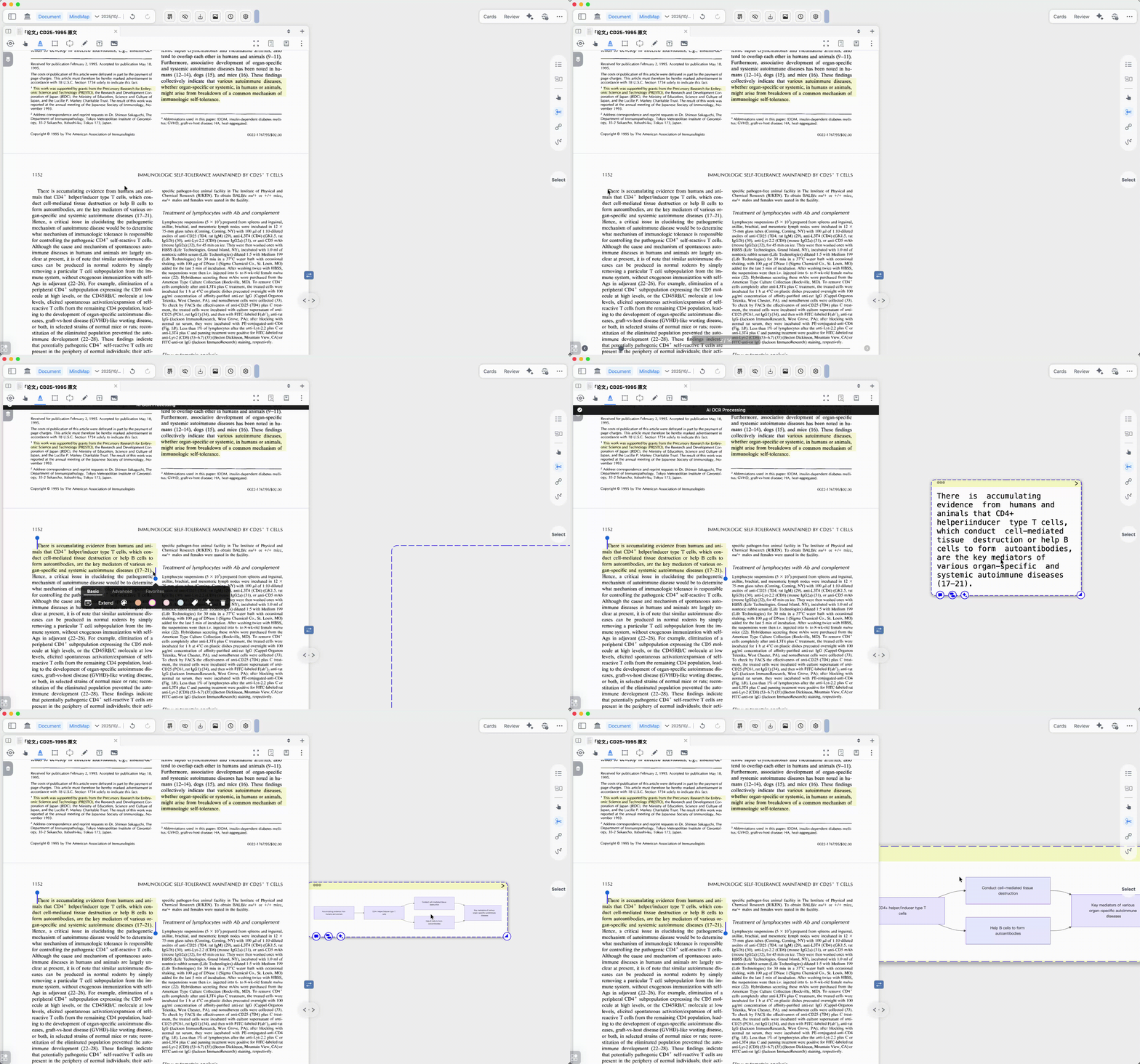
 How to Enable AI OCR?
Document Top Toolbar → Double-click the ‘Hand Tool’ or any ‘Excerpt Tool’ → In the settings panel that appears, enable “AI OCR” (Max users can also check **“Extra Actions”**).
 Learn more about AI OCR: User Manual
 We Value Your Feedback
If you have any suggestions or encounter issues, please feel free to reach out through:
-
MarginNote English Community: https://forum.marginnote.com/
-
Customer Support Email: service@momarginnote.com
Version 4.2.1 marks the beginning of a more efficient and powerful chapter.
We hope AI OCR and the various optimizations genuinely integrate into your learning workflow, making knowledge acquisition easier and thought recording freer.
Update now and unlock a new chapter of efficient learning! (Visit the App Store)
— MarginNote Team
1 Like
I think this feature didn’t arrive for me, currently using DMG version on iMac. I have MN4 max
Hi,apology for your waiting, DMG has just updated to v4.2.2!Please check and share your experience with us
1 Like